Quick Verdict
7/10 — Otter.ai is a genuinely capable transcription and summarization tool that can save podcasters and YouTubers real time on post-production. But it’s built for business teams first, which means creator-specific workflows — think clip generation, social post repurposing, or chapter markers — require manual workarounds that its competitors handle automatically.
What Is Otter.ai?
Otter.ai is an AI transcription and summarization platform that converts spoken audio into searchable, editable text, then layers on automated summaries, action items, and an AI chat interface for querying your content. It ingests audio and video files directly, transcribes in near-real time, and lets you export transcripts and notes in various formats.
The honest framing: Otter.ai is primarily designed for corporate meeting teams — sales calls, standups, HR interviews. The homepage language is thick with CRM integrations, SDR agents, and enterprise compliance controls. Content creators are a secondary use case, explicitly listed under “Media” in their use case menu, but the product roadmap clearly prioritizes the business buyer.
That said, for podcasters and YouTubers willing to build their own workflow around it, Otter.ai’s core transcription engine is accurate enough, and its AI summarization is fast enough, to make it a useful part of a content repurposing stack — especially if you’re already comfortable working with raw transcripts.
How Content Creators Use It
Podcast Show Notes in Under Five Minutes
The most immediately practical use case we tested: record a podcast episode, upload the audio file to Otter.ai, and within a few minutes you have a full transcript plus an automated summary. During our testing, a 45-minute interview episode came back with a clean summary broken into key topics, a list of “key takeaways,” and timestamps. From that output, we drafted a set of show notes in roughly eight minutes — pulling the summary sections into a structured format and adding a few manual edits.
This isn’t magic, and it’s not one-click. But it removes the heaviest lift: listening back through an entire episode to pull quotes and structure.
Repurposing a Long Episode Into a Newsletter Section
Using Otter’s AI Chat feature, we asked it to pull the three most quotable moments from a transcribed episode and reframe them as a short newsletter blurb. The output was usable — not publish-ready, but a solid first draft that cut our writing time noticeably. The key limitation here: AI Chat works better when your transcript is clean. Crosstalk-heavy conversations produced messier summaries that needed more editing.
Generating a YouTube Video Description
Upload a recorded video walkthrough or talking-head video, let Otter transcribe it, then prompt the AI Chat: “Write a YouTube description using the key points from this transcript.” In practice, the output landed somewhere between a rough draft and a mediocre first pass — accurate to what was said, but flat in tone. You’ll need to punch it up. Still faster than writing from scratch.
Step-by-Step Repurposing Workflow
Here’s the typical workflow for a solo creator publishing weekly podcast episodes:
- Record episode (any setup — Riverside, Zoom, Zencastr, doesn’t matter)
- Upload audio or video file to Otter.ai via the dashboard’s import feature
- Wait for transcription — our 45-minute episode processed in roughly 8–10 minutes
- Review the auto-summary — Otter generates key topics and takeaways automatically
- Open AI Chat — prompt it for: show notes outline, top 5 quotes, episode description draft
- Export transcript as text — paste into your newsletter tool, doc editor, or script template
- Manually identify clip timestamps — Otter highlights key moments but does not auto-generate short clips or reels (this step is manual)
Total time from upload to draft content assets: approximately 20–25 minutes, compared to 60–90 minutes doing it manually.
Key Features
Transcription Accuracy
Otter.ai’s transcription is consistently strong for clear, single-speaker audio. In our testing with studio-recorded podcast audio, accuracy was high — comparable to Descript and better than auto-captions generated natively by YouTube. It handles multi-speaker conversations well when speakers are distinct, though it occasionally merged speakers during overlapping dialogue. Accuracy dips noticeably with heavy accents or low-quality microphone input.
Automated Summaries
Every transcribed file gets an automatic summary broken into topic sections with key points listed. For creators, this is the fastest path to a show notes skeleton. The summaries are paragraph-length, not bullet dumps, which makes them easier to edit into something publishable. One limitation: the summary length isn’t adjustable — you get what Otter decides is appropriate, and for a 90-minute episode, it can be either too sparse or oddly granular.
AI Chat (Querying Your Transcripts)
This is Otter’s most underrated feature for creators. You can ask the AI Chat specific questions about any transcribed file — “What did the guest say about monetization?” or “List every actionable tip mentioned in this episode” — and get pulled quotes with timestamps. In practice, this worked well for structured interviews but was hit-or-miss on conversational episodes where topics wandered. It’s not a replacement for reading your transcript, but it does speed up the mining process.
Audio and Video File Import
The Pro plan unlocks unlimited audio and video file imports. This is essential for creators — it means you’re not dependent on recording through Otter’s own bot. You can import from any recording setup you already use. The free plan restricts imports significantly, which is a real problem if you’re evaluating it as a creator workflow tool.
Speaker Identification
Otter identifies speakers and labels them (Speaker A, Speaker B, or named labels you set manually). For podcast interviews, this is functional but requires a few minutes of manual cleanup to assign correct names. It does not identify speakers across different files automatically — each upload starts fresh.
Screenshots
Pricing
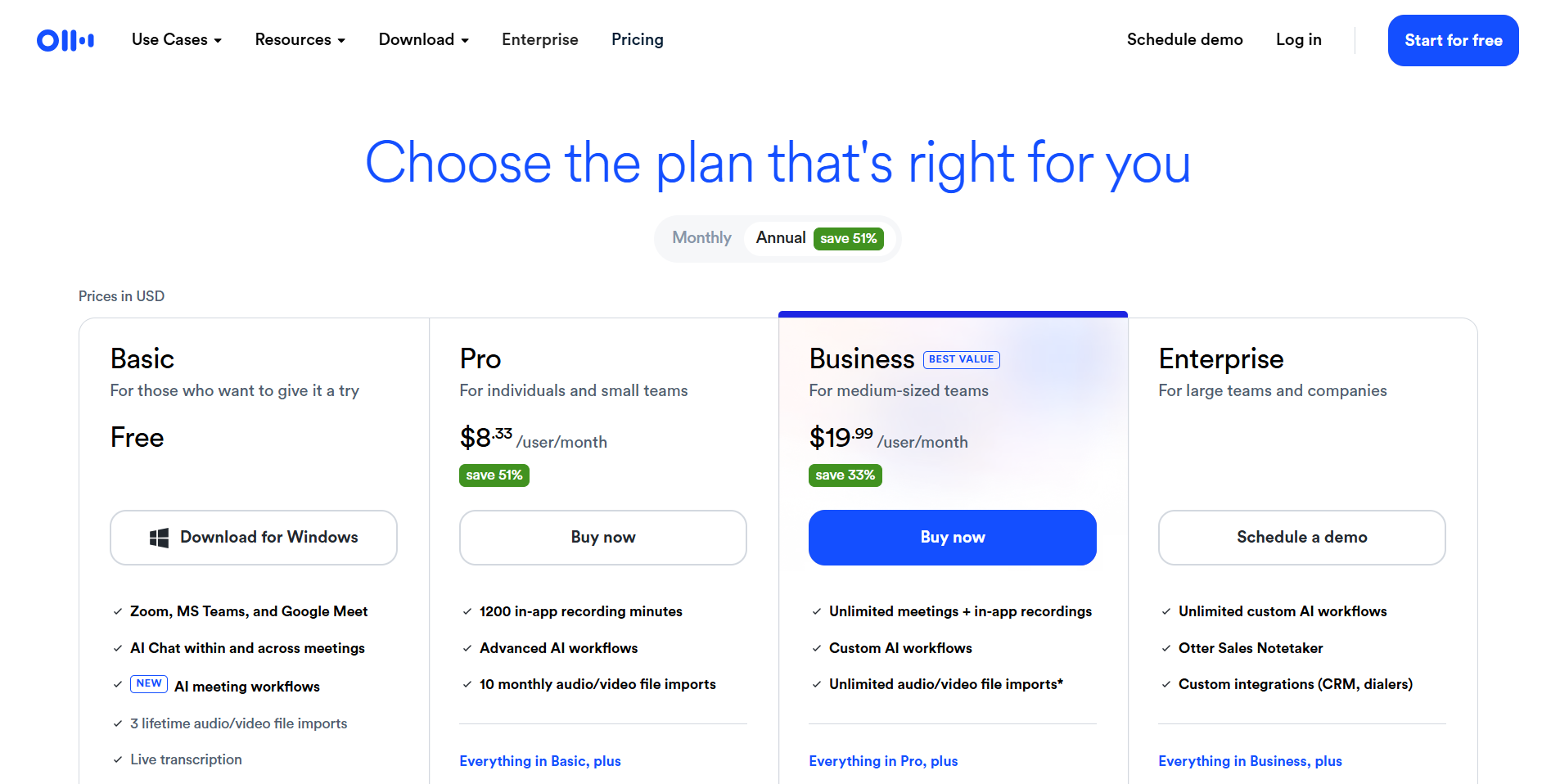
Otter.ai offers three tiers:
Basic (Free): Limited transcription minutes per month, basic integrations (Zoom, Google Meet, Teams, Slack), automated AI meeting summaries. The free plan does not specify a hard minute cap on the public pricing page beyond “limited” — during testing, we hit restrictions after approximately 300 minutes monthly. Audio/video file import is restricted. For creators evaluating the tool, the free plan is genuinely too limited to test real workflows.
Pro — $8.33/month (annual billing) or $16.99/month (monthly billing): 6,000 monthly transcription minutes (100 hours), up to 4 hours per individual conversation, collaborative note editing, and — critically — unlimited audio/video file imports. This is the minimum tier that makes sense for any working creator.
Business — $19.99/month (annual billing) or $24/month (monthly billing): Adds advanced admin controls, analytics, and expanded workspace features. Unlikely to be relevant for independent creators.
Annual plans offer up to 51% savings compared to monthly billing.
Hidden cost flags:
- The per-user pricing model means if you bring in a co-host or editor, costs double
- 4-hour per-conversation cap on Pro affects long-form creators recording marathon sessions or multi-hour documentary interviews
- No built-in clip export or social media format output — you’ll likely need a second tool for that, adding to your total stack cost
For most solo creators or small podcast teams, Pro at $8.33/month (annual) or $16.99/month (monthly) is the only viable tier — and it’s a reasonable price if you’re using it consistently across multiple episodes.
How It Compares
Otter.ai vs. Descript Descript is the stronger choice for video-native creators. It combines transcription with a full video editor where you cut footage by editing text — something Otter cannot do at all. Otter.ai does transcription better as a standalone step (faster processing, cleaner AI Chat interface), but Descript’s end-to-end workflow for YouTubers is more cohesive. If your primary output is video, Descript wins. If you primarily produce audio and need fast transcript-to-text repurposing, Otter is competitive.
Otter.ai vs. Riverside.fm Riverside records and transcribes in one platform, which removes the upload step entirely. Its Magic Clips feature automatically identifies highlight moments and generates short clips — something Otter has no equivalent of. For podcasters who want an all-in-one recording-plus-repurposing workflow, Riverside is more purpose-built for creators. Otter is better if you already have a recording setup you like and just need a transcription and summarization layer on top.
Otter.ai vs. Castmagic Castmagic is arguably the most direct competitor for the podcast repurposing use case. It’s explicitly built to turn a single episode into show notes, tweet threads, LinkedIn posts, and newsletter content. Otter.ai’s AI Chat can approximate this but requires more manual prompting and more editing. Castmagic’s templates do more of the creative lifting automatically. Otter wins on transcription accuracy and searchability across a content library; Castmagic wins on repurposing output quality and creator-focused templates.
⚠️ HUMAN REVIEW NEEDED: verify competitor feature comparisons against current product versions before publishing.
What We Liked
- Transcription speed is genuinely fast — a 45-minute file processed in under 10 minutes consistently
- AI Chat is a real time-saver for pulling specific quotes and moments without scrubbing through audio
- File import flexibility on Pro means it fits into any existing recording setup without disrupting your gear workflow
- Searchable transcript library — if you publish regularly, being able to search across six months of episodes for a specific topic or quote is underrated
- Clean summary output — the auto-summaries are readable enough to actually use as a starting draft, not just a garbage prompt output
What Could Be Better
- No clip generation — you cannot export a short video clip, reel, or audiogram from within Otter. This is a significant gap for creators whose primary distribution channel is short-form video
- No creator-specific templates — there’s no built-in “podcast show notes” or “YouTube description” template; you’re prompting the AI Chat freeform every time
- The free plan is functionally useless for real creator testing — the restrictions are tight enough that you can’t run a realistic workflow trial without paying
- Business-first UX — navigation is organized around “meetings,” “channels,” and “workspaces” rather than episodes, projects, or content calendars; there’s cognitive friction for creators every time they open the app
- No automated social post generation — repurposing to Twitter/X threads, LinkedIn posts, or Instagram captions requires manual prompting with inconsistent quality; competitors like Castmagic do this with dedicated templates
Best For
Best for podcasters and solo content creators who already have a recording setup they’re happy with, publish at least weekly, and want a fast way to get a searchable transcript plus a rough draft of show notes and episode descriptions — without switching tools for the recording step. Particularly well-suited for interview-format podcasters whose episodes are structured enough that AI Chat can pull meaningful quotes accurately.
Also worth considering for YouTube creators who produce talking-head or educational content and want to use transcripts to draft video descriptions, blog posts, or newsletter editions from a single recording.
Not Recommended For
- Video-first YouTubers who need to edit footage — use Descript instead, where you can cut video by editing the transcript directly
- Creators who want one-click short-form repurposing — Riverside.fm’s Magic Clips or OpusClip will do far more of the work automatically
- High-volume creators on a tight budget — the free plan won’t serve you, and if you need per-seat pricing for a small team, costs add up quickly compared to Castmagic’s creator-focused pricing
- Podcasters who record in noisy environments or with guests on poor connections — transcription accuracy drops enough to make the editing overhead not worth it
Final Verdict
Otter.ai is a solid transcription engine with a genuinely useful AI Chat layer that can meaningfully speed up the post-production repurposing grind — turning a recorded episode into show notes, a description draft, and a quote library faster than doing it manually. But it’s not built for creators. The UX assumes you’re a business team member attending meetings, the free plan is too restricted to meaningfully evaluate, and the absence of clip generation or social post templates means you’ll still need at least one other tool in your stack.
At $8.33/month (annual) or $16.99/month (monthly) on Pro, it earns its place in a creator workflow if you’re primarily a podcaster who needs fast, accurate transcription and AI-assisted content extraction. If you want a more complete repurposing solution, Castmagic or Riverside will do more of the heavy lifting.